What are Literals in C#?
الـ Literals في لغة C# هي ببساطة القيم الثابتة (أو الـ hard-coded values) اللي بتخصصها للمتغيرات بتاعتك. القيم دي مبتتغيرش أثناء تشغيل البرنامج.
- القيم الثابتة دي بنسميها
Literals. - الـ
Literalهو القيمة اللي بيستخدمها المتغير.
كمثال، لو كتبنا int x = 100;، هنا x هو المتغير، و 100 هي الـ Literal.
Types of Literals in C#
زي ما هو واضح، الـ Literals بتتقسم بشكل أساسي لخمس أنواع رئيسية.
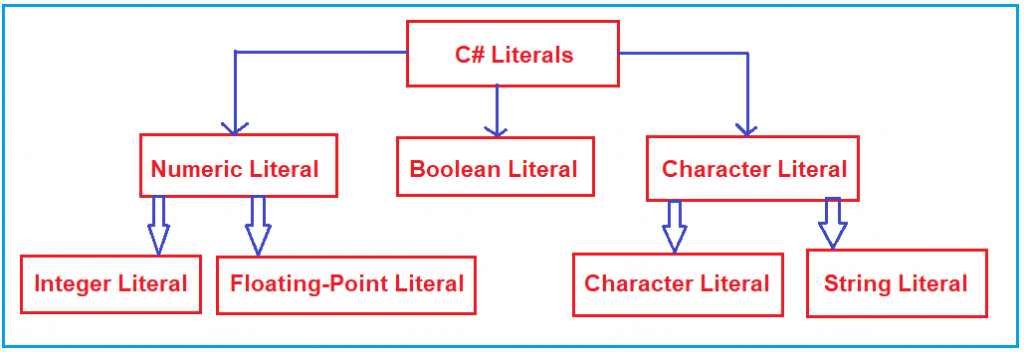
دلوقتي هنتكلم عن كل نوع منهم بالتفصيل.
Integer Literals
الـ Integer Literals بنستخدمها عشان نكتب قيم لأنواع البيانات زي int, uint, long, ulong, وغيرها. نقدر نعبر عن الـ Integer Literals بتلات طرق: Decimal (عشري)، Binary (ثنائي)، أو Hexadecimal (سداسي عشري).
عشان نميز بينهم، بنستخدم prefix (بادئة) قبل الرقم:
- الـ Binary: بنحط قبلها
0b. - الـ Hexadecimal: بنحط قبلها
0X. - الـ Decimal: مش محتاجة أي
prefix.
بشكل افتراضي، أي Integer Literal بيكون من نوع int. ولأنواع البيانات الصحيحة (زي byte, short, int, long)، نقدر نحدد القيم الثابتة بالطرق دي:
- الـ Decimal (Base-10): الأرقام المسموح بيها من 0 لـ 9. مش محتاج أي
prefix.- مثال:
int x = 101;
- مثال:
- الـ Hexadecimal (Base-16): الأرقام المسموح بيها من 0 لـ 9، وكمان الحروف من
aلـf(سواءuppercaseأوlowercase). هنا C# بتعمل استثناء، لإن بالرغم من إنها لغةcase-sensitive، لكن في الحالة دي مش بتفرق بين الحروف الكبيرة والصغيرة. الرقم الـHexadecimalلازم يبدأ بـ0Xأو0x.- مثال:
int x = 0X123F;
- مثال:
- الـ Binary (0 and 1): الأرقام المسموح بيها هي 0 و 1 بس. الرقم الـ
Binaryلازم يبدأ بـ0b.- مثال:
int x = 0b1111;
- مثال:
ملحوظة مهمة: مفيش حاجة اسمها Octal Number Literals في C#. ممكن تلاقي مواقع بتقول إن الأرقام الـ Octal (من 0 لـ 7) بتتعرف لما تبدأ بـ 0، زي int x=0146;، لكن ده كلام غلط. C# مبتدعمش الطريقة دي.
Example of Integer Literals
using System;
namespace LiteralsDemo
{
    class Program
    {
        static void Main(string[] args)
        {
            // Decimal literal (digits 0-9)
            int a = 101; // No suffix needed

            // Hexadecimal literal (digits 0-9, chars a-f)
            int c = 0x123f; // Prefix with 0x

            // Binary literal (digits 0-1)
            int d = 0b1111; // Prefix with 0b

            Console.WriteLine($"Decimal Literal: {a}");
            Console.WriteLine($"Hexa-Decimal Literal: {c}");
            Console.WriteLine($"Binary Literal: {d}");
            Console.ReadKey();
        }
    }
}
Output:
Decimal Literal: 101
Hexa-Decimal Literal: 4671
Binary Literal: 15
ممكن كمان نستخدم suffix (لاحقة) مع الـ integer literals.
- الـ
Uأوuبنستخدمها للـunsigned numbers. - الـ
Lأوlبنستخدمها للـlong numbers.
شوف المثال ده عشان تفهم أكتر:
using System;
namespace LiteralsDemo
{
    class Program
    {
        static void Main(string[] args)
        {
            int a = 1000;       // Integer
            uint b = 1000U;     // Unsigned Integer
            long c = 1000L;     // Long
            ulong d = 1000UL;   // Unsigned Long

            Console.WriteLine($"Integer Literal: {a}");
            Console.WriteLine($"Unsigned Integer Literal: {b}");
            Console.WriteLine($"Long Literal: {c}");
            Console.WriteLine($"Unsigned Long Literal: {d}");
            Console.ReadKey();
        }
    }
}
Output:
Integer Literal: 1000
Unsigned Integer Literal: 1000
Long Literal: 1000
Unsigned Long Literal: 1000
Floating-Point Literals
دي الـ Literals اللي بيكون فيها جزء صحيح وجزء عشري، يعني أرقام فيها علامة عشرية. بنستخدمها عشان نكتب قيم لأنواع بيانات زي float, double, و decimal.
بشكل افتراضي، أي floating-point literal بيكون من نوع double. عشان كده، مينفعش تخصص القيمة دي لمتغير float أو decimal بشكل مباشر.
- لو عايز تخصص قيمة لمتغير
float، لازم تضيف الـsuffixاللي هوfأوFفي آخر الرقم. - لو عايز تخصص قيمة لمتغير
decimal، لازم تضيفmأوM. - لو مضافتش أي
suffix، القيمة هتكونdoubleتلقائيًا. ممكن برضه تضيفdأوDعشان تحدد إنهاdoubleصراحةً، بس ده مش ضروري.
Example of Floating-Point Literals
using System;
namespace LiteralsDemo
{
    class Program
    {
        static void Main(string[] args)
        {
            // Default floating point literal is double
            double a = 10.15;

            // Suffix with F for float
            float b = 100.72F;

            // Suffix with D for double (optional)
            double c = 1.45D;

            // Suffix with M for decimal
            decimal d = 1.44M;

            Console.WriteLine($"Double Literal: {a}");
            Console.WriteLine($"Float Literal: {b}");
            Console.WriteLine($"Double Literal: {c}");
            Console.WriteLine($"Decimal Literal: {d}");

            Console.ReadKey();
        }
    }
}
Output:
Double Literal: 10.15
Float Literal: 100.72
Double Literal: 1.45
Decimal Literal: 1.44
Character Literals
الـ Character Literals في C# بتتحط بين علامات تنصيص فردية (single quotes)، زي 'a'، وبتتخزن في متغير من نوع char. الـ character literal ممكن يكون:
- حرف عادي زي
'a'. - الـ
escape sequenceزي'\t'. - الـ
universal characterزي'\u02B0'.
يعني نقدر نحدد الـ character literals بتلات طرق:
-
الـ Using Single Quote: نحدد حرف واحد بين
single quote. مثال:char ch = 'A'; -
الـ Using Unicode Representation: نستخدم صيغة
'\uXXXX'، حيثXXXXهي 4 أرقامhexadecimal. مثال:char ch = '\u0041';(ده بيمثل حرفA). -
الـ Using Escape Sequence: أي
escape characterفي C# نقدر نستخدمه كـcharacter literal. مثال:char ch = '\n';
فيه حروف معينة في C# لما بيجي قبلها backslash (\) بيبقى ليها معنى خاص، زي \n (سطر جديد) و \t (مسافة tab). دي قايمة ببعض الـ escape sequence characters:
\': علامة تنصيص فردية\": علامة تنصيص مزدوجة\\: Backslash\n: سطر جديد\r: Carriage return\t: Tab\b: Backspace
Example of Character Literals
using System;
namespace LiteralsDemo
{
    class Program
    {
        static void Main(string[] args)
        {
            // Character literal using single quote
            char ch1 = 'A';
            Console.WriteLine("Single Quote: " + ch1);

            // Character literal using Unicode representation
            char ch2 = '\u0041'; // Represents 'A'
            Console.WriteLine("Unicode: " + ch2);

            // Character literal using Escape character
            Console.WriteLine("Escape: Hello\nDotNet\tTutorials");
            Console.ReadKey();
        }
    }
}
Output:
Single Quote: A
Unicode: A
Escape: Hello
DotNet  Tutorials
String Literals
دي الـ Literals اللي بتتحط بين علامات تنصيص مزدوجة (" ") أو بتبدأ بـ @"". في C#، بنعبر عن الـ string literals بطريقتين:
-
الـ Regular String Literals: نص عادي بيتكون من صفر أو أكتر من الحروف ومحطوط بين
double quotes، زي"Dot Net Tutorials". ممكن يحتوي علىescape sequencesعادية أوUnicode escape sequences. مثال:"Dot\nNet\tTutorials" -
الـ Verbatim String Literals: بيبدأ بعلامة
@وبعدهاdouble quote. بيخزن الحروف والـescape sequencesزي ما هي بالظبط من غير ما يفسرها. مثال:@"Dot\nNet\tTutorials"، هنا\nو\tهيتطبعوا كنص عادي.
Example of String Literals
using System;
namespace LiteralsDemo
{
    class Program
    {
        static void Main(string[] args)
        {
            string str1 = "Dot Net Tutorials";
            string str2 = @"Dot Net Tutorials";
            string str3 = "Dot\nNet\tTutorials";
            string str4 = @"Dot\nNet\tTutorials";

            Console.WriteLine($"str1: {str1}");
            Console.WriteLine($"str2: {str2}");
            Console.WriteLine($"str3: {str3}");
            Console.WriteLine($"str4: {str4}");
            Console.ReadKey();
        }
    }
}
Output:
str1: Dot Net Tutorials
str2: Dot Net Tutorials
str3: Dot
Net     Tutorials
str4: Dot\nNet\tTutorials
Boolean Literals
الـ Boolean Literals ليها قيمتين بس: true و false. القيم دي ملهاش أي تمثيل رقمي، يعني true مش بتساوي 1 و false مش بتساوي 0.
مثال:
bool b1 = true;
bool b2 = false;
// bool b3 = 0; // Error
// bool b4 = 1; // Error
ملحوظة مهمة: القيم لازم تتكتب lowercase بالظبط (true و false). أي شكل تاني زي True أو TRUE هيسبب compile time error.
Example of Boolean Literals
using System;
namespace LiteralsDemo
{
    class Program
    {
        static void Main(string[] args)
        {
            bool b1 = true;
            bool b2 = false;

            Console.WriteLine(b1);
            Console.WriteLine(b2);
            Console.ReadKey();
        }
    }
}
Output:
True
False
Binary Literals
الـ Binary Literal بنستخدمه عشان نخزن قيمة ثنائية (binary) في متغير. عشان تعمل binary literal، لازم القيمة تبدأ بـ 0b. الحروف المسموح بيها هنا هي 0 و 1 بس. لو استخدمت أي رقم تاني، هيحصل compile time error.
int num1 = 0b10001;// مسموحint num2 = 0b1000145;// خطأ
لما الكومبايلر بيشوف 0b، بيفهم على طول إن القيمة دي binary literal.
Example of Binary Literals
using System;
namespace LiteralsDemo
{
    class Program
    {
        static void Main(string[] args)
        {
            // Creating binary literals by prefixing with 0b
            int Num1 = 0b100111101;
            int Num2 = 0b01000011;
            // int num3 = 0b100134; // This will cause a compile-time error

            Console.WriteLine($"Value of Num1 is: {Num1}");
            Console.WriteLine($"Value of Num2 is: {Num2}");
            Console.WriteLine($"Char value of Num1 is: {Convert.ToChar(Num1)}");
            Console.WriteLine($"Char value of Num2 is: {Convert.ToChar(Num2)}");
            Console.ReadKey();
        }
    }
}
Output:
Value of Num1 is: 317
Value of Num2 is: 67
Char value of Num1 is: M
Char value of Num2 is: C
ملحوظة أخيرة: خاصية الـ Binary Literals في C# بتسمحلنا نتعامل مع القيم الثنائية بسهولة في تطبيقاتنا عن طريق استخدام البادئة 0b.